Genesis Offroad G Screen for GEN3 Dual Battery Systems
G Screen Monitoring System
for Gen 3 dual battery systems
Keep an eye on the status of your dual battery system
Monitors voltage levels of both batteries.
Remote status indicator - shows if the batteries are connected or disconnected.
Remote boost button - jump start the engine from inside the cab if your cranking battery is dead.
Background changes color to visually show your battery status at a glance
- Green - both batteries are fully charged, and they are connected together
- Yellow - the batteries are below 12.7v, and they are disconnected
- Red - at least 1 battery is below 12v. The screen will blink red a few times per minute to get your attention
Background light turns off after 45 seconds of inactivity
- Preserves battery power
- No glare while driving at night
- Voltage and status is still visible, but without the backlighting

Main Battery Voltage
Holding this screen down for 3 seconds will turn off the screen. Tap once to turn the screen back on.

Aux Battery Voltage
Holding this screen down for 3 seconds will turn off the screen. Tap once to turn the screen back on.

Status Screen:
AUTO mode - the system will automatically connect / disconnect the batteries based on the voltage levels
AUTO OFF - the batteries are isolated from each other
AUTO ON - the batteries are connected together

Hold screen down for 3 seconds to access the Boost menu
When the background turns white, tap the screen to cycle through the menu
Stop tapping to select the desired mode

Selecting Boost On will manually connect the batteries together
Use this to jump start from the second battery if your main battery is too low to start the engine
They will remain connected until you select Boost Off or Auto mode
NOTE all electrical circuits in the vehicle will run from both batteries in this mode

Selecting Boost Off will manually separate the batteries
They will remain separated until you select Boost On or Auto mode
NOTE your Aux battery will not be charged by the alternator while in this mode

Selecting Auto On will set the system to Automatic mode

This screen shows the air pressure in your on-board air tank
if you have the optional Digital Air Pressure Sensor kit installed
Without the sensor installed, this screen will not be displayed

This screen shows the firmware version
Holding this screen down for 3 seconds will enter the contrast adjustment menu,
allowing you to tap through 5 levels of contrast for optimal viewing
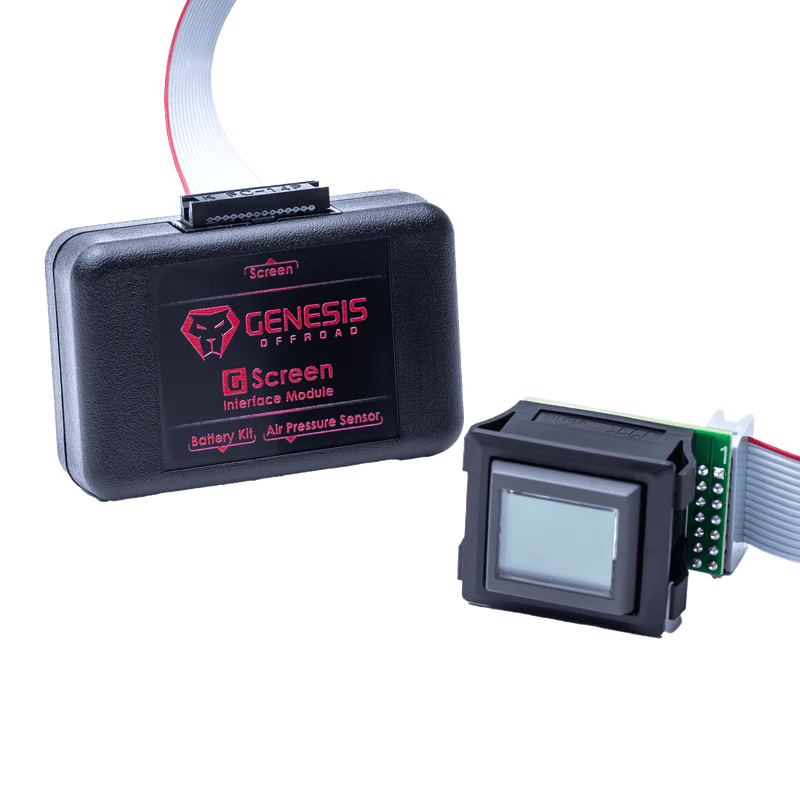
Kit Contents:
- G Screen
- Interface Module
- Ribbon Cable
- Wire Harness
- Panel Cutout Template
Screen measures approximately one cubic inch. Compact size makes it easy to mount anywhere.
Includes a 13 foot wiring harness for simple, clean installation
Software upgradeable for future features

Add the optional Genesis digital air pressure sensor to monitor the PSI level in your on-board air system.
Screw the sensor into an available 1/4 inch NPT port on your air tank or manifold
Attach the waterproof cable to the sensor, and route the cable to the G Screen. Plug the other end into the interface module.
The G Screen automatically detects the sensor and adds a new screen showing the PSI level in your tank, from 0-150 PSI.
No air hoses to run, no wiring to figure out!
Original: $299.00
-70%$299.00
$89.70Product Information
Product Information
Shipping & Returns
Shipping & Returns
Description
G Screen Monitoring System
for Gen 3 dual battery systems
Keep an eye on the status of your dual battery system
Monitors voltage levels of both batteries.
Remote status indicator - shows if the batteries are connected or disconnected.
Remote boost button - jump start the engine from inside the cab if your cranking battery is dead.
Background changes color to visually show your battery status at a glance
- Green - both batteries are fully charged, and they are connected together
- Yellow - the batteries are below 12.7v, and they are disconnected
- Red - at least 1 battery is below 12v. The screen will blink red a few times per minute to get your attention
Background light turns off after 45 seconds of inactivity
- Preserves battery power
- No glare while driving at night
- Voltage and status is still visible, but without the backlighting
Main Battery Voltage
Holding this screen down for 3 seconds will turn off the screen. Tap once to turn the screen back on.
Aux Battery Voltage
Holding this screen down for 3 seconds will turn off the screen. Tap once to turn the screen back on.
Status Screen:
AUTO mode - the system will automatically connect / disconnect the batteries based on the voltage levels
AUTO OFF - the batteries are isolated from each other
AUTO ON - the batteries are connected together
Hold screen down for 3 seconds to access the Boost menu
When the background turns white, tap the screen to cycle through the menu
Stop tapping to select the desired mode
Selecting Boost On will manually connect the batteries together
Use this to jump start from the second battery if your main battery is too low to start the engine
They will remain connected until you select Boost Off or Auto mode
NOTE all electrical circuits in the vehicle will run from both batteries in this mode
Selecting Boost Off will manually separate the batteries
They will remain separated until you select Boost On or Auto mode
NOTE your Aux battery will not be charged by the alternator while in this mode
Selecting Auto On will set the system to Automatic mode
This screen shows the air pressure in your on-board air tank
if you have the optional Digital Air Pressure Sensor kit installed
Without the sensor installed, this screen will not be displayed
This screen shows the firmware version
Holding this screen down for 3 seconds will enter the contrast adjustment menu,
allowing you to tap through 5 levels of contrast for optimal viewing
Kit Contents:
- G Screen
- Interface Module
- Ribbon Cable
- Wire Harness
- Panel Cutout Template
Screen measures approximately one cubic inch. Compact size makes it easy to mount anywhere.
Includes a 13 foot wiring harness for simple, clean installation
Software upgradeable for future features
Add the optional Genesis digital air pressure sensor to monitor the PSI level in your on-board air system.
Screw the sensor into an available 1/4 inch NPT port on your air tank or manifold
Attach the waterproof cable to the sensor, and route the cable to the G Screen. Plug the other end into the interface module.
The G Screen automatically detects the sensor and adds a new screen showing the PSI level in your tank, from 0-150 PSI.
No air hoses to run, no wiring to figure out!